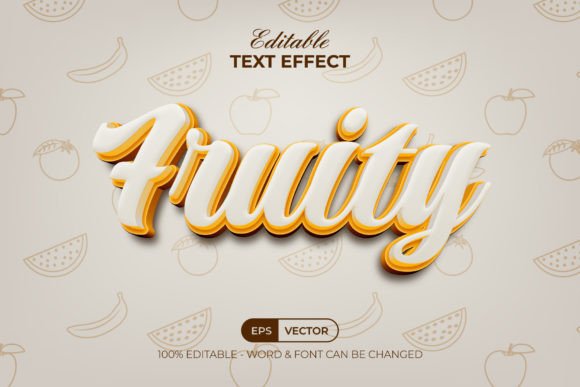
Fruity Text Effect 3D Style: A Practical Guide for Designers and Creators
In the fast-paced world of digital design, finding the right visual hook can make or break a project. Whether you are crafting a logo for a new startup, designing a flyer for a local event, or creating social media assets for a brand, typography often carries the weight of the message. This is where tools like the Fruity Text Effect 3D Style become invaluable. Unlike traditional fonts that simply sit flat on a page, this resource offers a dynamic, three-dimensional aesthetic that instantly grabs attention without requiring advanced 3D modeling skills.
The core appeal of this specific graphic style set lies in its simplicity and versatility. It is not a font file that you install on your computer; rather, it is a pre-configured set of Adobe Illustrator effects stored directly in the Graphic Styles menu. This distinction is crucial for users who want high-end results without the steep learning curve associated with complex vector manipulation. By selecting a text layer and applying the style, the software automatically renders a vibrant, 3D-looking effect that mimics fresh, colorful fruit textures or bold pop-art aesthetics.
How the Workflow Actually Works
Understanding the mechanics behind the Fruity Text Effect 3D Style helps demystify the process for anyone hesitant to try it. The workflow is designed to be intuitive. Once you have downloaded the package and opened the included AI or EPS file in Adobe Illustrator CC or a newer version, the styles are ready to go. You do not need to trace paths or manually apply gradients.
The process is straightforward: type your desired text or draw a shape, then click the corresponding style from the Graphic Styles panel. The magic happens instantly. Because the effect is built using editable layers and standard vector operations, you retain full control over the outcome. You can change the text content at any time, swap out the font family, or adjust the color palette to match your brand guidelines. The fact that the text remains 100% editable means you aren't locked into a static image; you can refine the wording until the last minute without losing the visual impact.
Real-World Applications for Businesses and Marketers
For entrepreneurs and small business owners, time is a currency just as valuable as money. The Fruity Text Effect 3D Style serves as a productivity booster, allowing non-designers to create professional-grade graphics quickly. Consider a local juice bar launching a summer promotion. Instead of hiring an expensive agency to create a custom 3D logo treatment, the owner can use this effect to generate eye-catching headlines for Instagram stories, posters, and menu boards. The "fruity" nature of the style aligns perfectly with food and beverage branding, evoking freshness and energy.
Marketers managing social media campaigns also benefit significantly. In a feed dominated by flat images, 3D text stands out. A blogger reviewing a tech product might use the effect to highlight key features in their thumbnail images, while an educator creating course materials could use it to emphasize chapter titles in digital handouts. The RGB color support ensures that these designs look vibrant on screens, which is essential for digital-first marketing strategies.
Freelancers offering graphic design services can also integrate this tool into their toolkit. When a client requests a "fun," "bold," or "youthful" look, having a library of ready-to-use styles allows the freelancer to present mockups rapidly. This speed in prototyping can lead to faster client approvals and more efficient project timelines.
Educational and Personal Projects
Beyond commercial use, the Fruity Text Effect 3D Style opens doors for hobbyists and students learning graphic design. For those studying vector illustration, dissecting how these styles are constructed offers a practical lesson in layer management, blending modes, and gradient mapping. Since the files come with well-organized layers, learners can open the artwork and see exactly how the 3D illusion is achieved, turning a finished product into an educational resource.
Hobbyists creating personalized gifts, such as birthday cards or party invitations, can leverage the playful aesthetic. Imagine a birthday invitation for a child's party featuring a cake-themed headline created with this effect. The ability to customize the colors means the text can match the party theme perfectly, whether it's pastel pinks or neon greens. Similarly, educators creating classroom decorations or presentation slides can use the effect to make learning materials more engaging for students.
Key Features That Drive Results
What separates this resource from generic clip art is the attention to detail in its construction. The inclusion of both AI and EPS files ensures compatibility across different versions of Adobe Illustrator, protecting your investment regardless of your software update cycle. The "Read Me" text file is particularly important, as it provides direct download links for the free fonts used in the preview. This eliminates the common frustration of opening a design only to find missing fonts, ensuring a seamless experience from download to final export.
The organization of layers is another critical feature. In many low-quality graphic resources, layers are messy or grouped illogically, making edits a nightmare. Here, the structure is clean, allowing you to tweak individual elements of the 3D effect if needed. For instance, if you want to change the shadow depth or the highlight intensity, you can do so without breaking the entire design. This flexibility is what transforms a simple template into a powerful design asset.
Considerations Before You Download
While the Fruity Text Effect 3D Style is incredibly versatile, it is important to approach it with realistic expectations. First, ensure you have Adobe Illustrator CC or a compatible version installed. While the EPS file offers some backward compatibility, the full functionality of the Graphic Styles menu is best experienced in modern versions of the software. If you are working strictly in Photoshop or Canva, this specific format may not be directly usable without conversion, which could alter the quality of the vector edges.
Additionally, consider the context of your project. The "fruity" and 3D aesthetic is bold and playful. It works exceptionally well for lifestyle brands, entertainment, food, and youth-oriented content. However, it might feel out of place in contexts requiring extreme minimalism or corporate seriousness, such as a law firm's annual report or a medical journal cover. Always test the effect against your overall design palette to ensure harmony.
Finally, remember that while the tool handles the heavy lifting of the 3D rendering, good design still requires good taste. The effect is a starting point, not a finish line. Take the time to adjust the kerning, choose complementary background colors, and ensure the hierarchy of information is clear. By combining the technical ease of the Fruity Text Effect 3D Style with thoughtful design principles, you can create visuals that are not only striking but also effective in communicating your message.
Whether you are a seasoned designer looking to speed up your workflow or a beginner eager to create something impressive, this resource bridges the gap between ambition and execution. It proves that you don't need to be a 3D master to achieve dimensional, colorful, and professional text effects. With the right tools and a bit of creativity, the possibilities for your next project are truly endless.