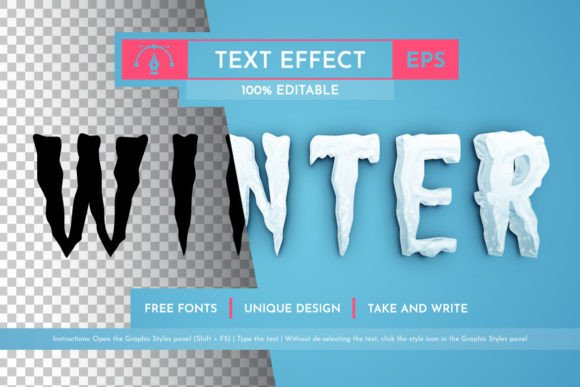
Winter Editable Text Effect for Illustrator
Creating compelling winter-themed graphics often requires more than just a simple font choice. It demands texture, depth, and an atmosphere that instantly evokes the season. The Winter Editable Text Effect provides exactly this, offering a professional-grade solution for designers who need to add frosty elegance to their headlines without spending hours building complex effects from scratch. Whether you are designing a holiday marketing campaign, a seasonal blog header, or a festive event invitation, having a versatile, vector-based tool at your disposal transforms the design workflow.
This resource is specifically crafted for Adobe Illustrator users, ensuring compatibility with CC 2014 and all subsequent versions. Unlike raster images that lose quality when resized, this effect remains crisp and sharp at any scale. The ability to manipulate colors and adjust layers means you are not stuck with a single look; instead, you have a dynamic template ready to be customized for your specific brand identity or project requirements.
Why Vector Quality Matters for Seasonal Design
In the world of digital and print design, file format dictates flexibility. The primary advantage of the Winter Editable Text Effect lies in its vector foundation. When you work with vectors, you are dealing with mathematical paths rather than fixed pixels. This distinction is crucial for creators who need to adapt a single asset across multiple platforms.
Imagine needing a headline for a small social media story and then scaling that same text up for a large outdoor billboard. A raster image would blur or pixelate, ruining the professional finish. With this vector effect, you can scale infinitely without losing a single point of clarity. You can rotate the text, stretch it, or shrink it to fit tight layouts, and the icy textures will remain perfectly defined. This scalability ensures that your designs look premium whether they appear on a mobile screen or a printed brochure.
Organized Layers for Efficient Workflow
One of the most common frustrations for designers using third-party assets is navigating messy, unorganized layer panels. This resource solves that problem by providing a fully structured environment. Every element of the winter effect is placed on its own distinct layer, labeled logically for easy identification.
This organization allows you to isolate specific parts of the effect. Perhaps you want to keep the main text but remove the snowflakes, or maybe you wish to change the color of the frost while keeping the background shadow intact. Because the layers are ordered and accessible, you can make these adjustments in seconds. This level of control is essential for maintaining consistency across a series of designs, such as a multi-part email campaign or a set of social media posts.
Creative Applications Across Industries
The versatility of the Winter Editable Text Effect extends far beyond generic holiday greetings. Different sectors can adapt this style to meet unique communication goals. Here is how various professionals can leverage this tool:
- Marketers and Advertisers: Use the effect to create eye-catching headlines for winter sales campaigns. The bright, attractive nature of the frost helps grab attention in crowded news feeds. You can easily change the text color to match your brand palette while retaining the seasonal appeal.
- Bloggers and Content Creators: Apply the effect to featured images or section headers within your articles. It adds a thematic touch to winter travel guides, recipe collections, or lifestyle content without requiring advanced illustration skills.
- Small Business Owners: Create custom flyers for local events, holiday parties, or seasonal menu updates. The ease of editing allows you to update dates and details quickly while maintaining a polished, professional look.
- Educators and Publishers: Incorporate the effect into worksheets, book covers, or educational materials about winter science or history. The clear vector lines ensure readability even when printed in black and white or grayscale.
Adapting the Style for Different Audiences
While the core effect provides a standard winter look, the true power lies in customization. For a corporate audience, you might tone down the brightness, opting for cool blues and silvers to convey professionalism and stability. Conversely, for a children's event or a playful brand, you can shift the palette to vibrant purples, pinks, and golds to create a magical, festive vibe.
The included Graphic Styles panel takes this customization a step further. By saving the effect settings as a graphic style, you can apply the entire winter treatment to new text objects with a single click. This feature is invaluable for maintaining visual consistency across a large project. If you decide later that the frost needs to be slightly thicker or the glow softer, you can update the style once, and every instance of the text in your document updates automatically.
Practical Implementation and File Management
Getting started with the Winter Editable Text Effect is straightforward, thanks to the comprehensive package provided. The download includes an AI file for full editing capabilities in Illustrator, an EPS file for broad compatibility with other vector software, and a dedicated Graphic Styles file for quick application.
To utilize the effect effectively, open the AI file in Adobe Illustrator CC 2014 or later. Navigate to the Type tool, enter your desired headline, and select the pre-set graphic style. You will immediately see the transformation. From there, use the Direct Selection Tool to tweak individual anchor points if necessary, or simply double-click the text object to edit the wording. The organized layers mean you can also hide or delete elements like falling snow or ice drips if they interfere with your layout.
For those printing physical materials, the vector format ensures high-resolution output suitable for professional printers. There is no risk of jagged edges or blurriness, which is a common issue with low-quality clip art. Additionally, the package includes a help file detailing the fonts used, allowing you to replicate the typography if you wish to build upon the design further.
Maintaining Originality and Consistency
Using pre-made effects does not mean sacrificing originality. In fact, having a solid base allows you to focus on creative composition rather than technical execution. To keep your results fresh, experiment with blending modes. Try setting the frost layer to "Screen" or "Overlay" to integrate it differently with your background colors. You can also combine this winter effect with other textures, such as paper grain or wood patterns, to create unique hybrid styles.
Consistency is key for branding. Once you have finalized your color scheme and layer adjustments for a specific project, save that version as a template. This ensures that all future materials—whether they are social media banners, email headers, or print ads—share the same visual language. This approach builds recognition and trust with your audience, as they begin to associate the specific winter aesthetic with your brand or message.
Support and Continuous Improvement
Every digital product benefits from user feedback. The creator of this resource, Aleksandr Gusev, emphasizes the importance of community interaction to refine the files. If you encounter any errors, missing links, or formatting issues during your workflow, reporting them helps improve the product for everyone. This collaborative approach ensures that the Winter Editable Text Effect remains a reliable tool for designers worldwide.
Whether you are a seasoned illustrator or a hobbyist looking to elevate your holiday projects, this editable text effect offers a practical bridge between inspiration and execution. It removes the technical barriers to creating stunning winter graphics, allowing you to focus on what matters most: telling your story with clarity and style. By leveraging the power of vector formats, organized layers, and customizable graphic styles, you can produce professional results that stand out in any seasonal context.