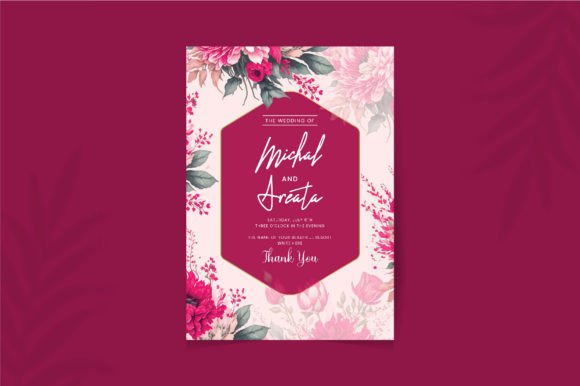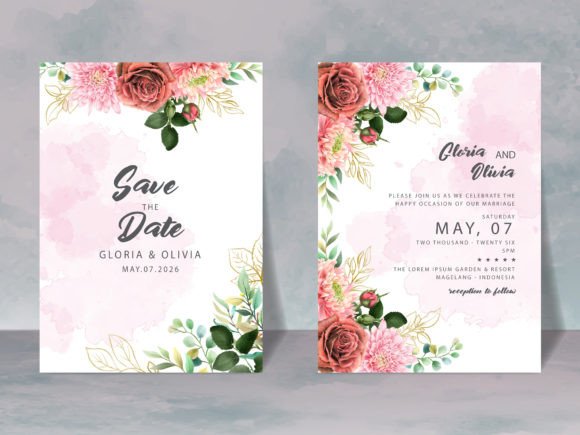
Wedding Invitation Templates Mini Bundle: A Smart Guide to Stylish, Budget-Friendly Invites
Planning a wedding involves countless decisions, but the invitation suite often sets the tone for the entire event. It is the first tangible interaction your guests have with your celebration. For many couples and planners, the pressure to find something unique yet affordable can lead to costly mistakes or last-minute stress. The Wedding Invitation Templates Mini Bundle offers a practical solution, allowing you to create elegant, cohesive stationery without breaking the bank. However, simply purchasing a template isn't enough; understanding how to utilize it correctly is what separates a professional look from an amateur one.
Why Choose a Digital Template Bundle?
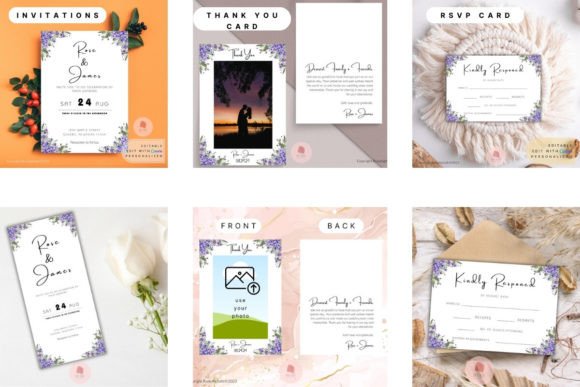
The primary appeal of this bundle lies in its flexibility and cost-effectiveness. Traditional custom design services can run into hundreds of dollars, whereas this digital package provides a comprehensive set of designs for a fraction of the price. You gain access to multiple formats, including standard print sizes like 4″x6″ and 5″x7″, as well as electronic dimensions optimized for mobile sharing (1080 x 1920 px and 1125 x 2436 px). This versatility means you can send physical cards to older relatives while simultaneously sharing a sleek digital invite via WhatsApp or email with younger friends.
Furthermore, the inclusion of Thank You Card templates in US, UK, and AU sizes ensures that your post-wedding gratitude matches your pre-wedding elegance. By using a unified design language across invitations, RSVPs, and thank-you notes, you create a polished brand for your wedding day. The ability to edit these files directly in Canva removes the need for expensive graphic design software, making high-quality design accessible to everyone.
Common Pitfalls When Using Wedding Invitation Templates
While the concept is straightforward, several common misunderstandings can derail the process if not addressed early. One of the most frequent errors is assuming that "editable" means "easy." While the Wedding Invitation Templates Mini Bundle is designed for simplicity, users often overlook the importance of font hierarchy and spacing. Simply typing your details over the existing text without adjusting margins or line heights can result in a cluttered, unprofessional appearance.
Another critical mistake is ignoring the difference between print and digital resolution. Many users attempt to download a file intended for social media screens and print it on home printers, resulting in blurry text and pixelated images. The bundle specifically addresses this by offering distinct file sizes, but users must know which format serves which purpose. Using a low-resolution JPEG for a large 5″x7″ card will compromise the quality of your final product.
Perhaps the most significant oversight is the expectation of physical delivery. Because this is a digital product, no physical item will be sent. Some buyers expect a box of printed cards to arrive at their doorstep, leading to confusion and dissatisfaction. Understanding that you are purchasing a license to use a digital file—and that you are responsible for the printing or digital distribution—is essential before making a purchase.
Maximizing Your Results with Canva
To get the best results from your Wedding Invitation Templates Mini Bundle, you need a free Canva account. Canva is a powerful tool, but it requires a bit of familiarity to unlock its full potential. If you are new to the platform, start by opening the template on a laptop or desktop computer rather than a mobile device. While mobile editing is possible, the screen real estate on a computer allows for more precise adjustments to text boxes, image placement, and alignment.
When customizing the text, avoid using too many different fonts. The templates likely come with a curated selection of typefaces that work well together. Stick to two or three maximum: one for the names, one for the details, and perhaps a third for accents. Changing the color scheme is easy, but ensure there is enough contrast between the text and the background so the information remains readable. A beautiful design is useless if your guests cannot read the date or time.
Uploading your own photos is a great way to personalize the suite. However, do not just slap a low-quality phone snapshot onto the design. Use high-resolution images, preferably taken in good lighting. In Canva, navigate to the "Uploads" section on the left sidebar to add your photos. Once uploaded, drag them into the designated frames. If the image looks stretched or distorted, check the aspect ratio settings within Canva to ensure the photo fits the frame naturally.
What to Check Before You Buy and Edit
Before finalizing your purchase or starting your edits, take a moment to verify that this bundle meets your specific needs. First, confirm the paper size requirements for your region. The bundle includes US standard sizes (4″x6″, 5″x7″) and metric sizes for the UK and Australia (A6, A5). If you plan to print locally, ensure the dimensions match the stock available at your local print shop to avoid awkward cropping or wasted paper.
Secondly, consider your guest list's tech-savviness. If you plan to use the electronic invitation options (MP4, JPEG, PNG), ensure your guests are comfortable receiving invites via digital channels. The 1080 x 1920 px and 1125 x 2436 px formats are perfect for Instagram stories or direct messages, but they should complement, not replace, traditional communication for those who prefer it.
Finally, review the download options carefully. The bundle supports PDF for high-quality printing, JPEG and PNG for general sharing, and MP4 for animated digital invites. If you intend to print professionally, always download the PDF version labeled "Best for printing." This format preserves vector sharpness and color accuracy, ensuring your invitations look crisp when produced by a professional printer.
A Step-by-Step Approach to Success
To streamline your workflow, follow this logical progression. Start by gathering all your wedding details—names, dates, times, locations, and dress code—before opening the template. Having this information ready prevents back-and-forth editing later. Next, open the template in Canva on your computer. Review the layout and decide which elements you want to keep and which you want to modify.
Edit the text first, paying close attention to spelling and grammar. Mistakes on an invitation are permanent once printed, so double-check everything. Then, customize the colors and fonts to match your wedding theme. Upload your photos and place them strategically. Once satisfied, preview the design in full-screen mode to catch any alignment issues.
After editing, download your files in the appropriate formats. Save the PDF for your printer and the JPEG/PNG/MP4 versions for your digital guests. If you are printing at home, test print one copy on regular paper first to check the margins and color balance before committing to expensive cardstock. This simple step can save you from wasting materials and money.
By approaching the Wedding Invitation Templates Mini Bundle with preparation and attention to detail, you transform a simple digital file into a stunning reflection of your special day. Avoiding common pitfalls like resolution errors and formatting mistakes ensures that your invitations communicate clarity and style. With the right tools and a little patience, you can achieve a professional look that delights your guests and stays within your budget.