Evaluating the Brush Powerpoint Template for Professional Presentations
In the landscape of digital communication, the visual quality of a presentation often dictates its reception. Professionals aged 20 to 50 frequently find themselves balancing the need for rapid content delivery with the necessity of maintaining a polished, modern aesthetic. The Brush Powerpoint Template, developed by Sky Creation, enters this space as a specific design resource aimed at enhancing slide decks with futuristic aesthetics and unique layouts. Unlike generic templates that rely on stock photography or standard corporate grids, this tool focuses on dynamic graphic elements that mimic brush strokes and fluid motion, offering a distinct alternative to rigid, traditional formats.
When considering whether this template fits your workflow, it is essential to understand not just what it offers, but how it compares to other design approaches available in the market. This evaluation explores the features, editability, and practical application of the Brush Powerpoint Template to help you determine if it aligns with your specific presentation goals.
Design Philosophy and Visual Distinctiveness
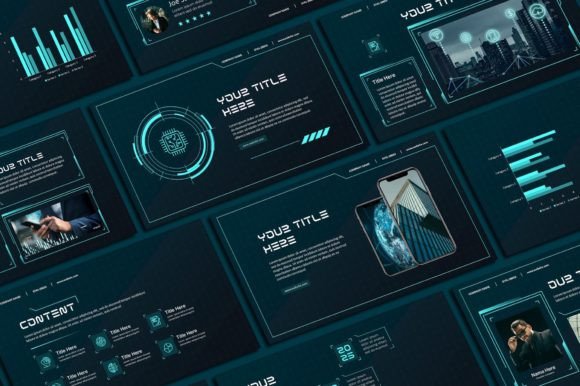
The primary differentiator of the Brush Powerpoint Template is its commitment to a "futuristic" yet organic visual language. Most standard templates prioritize clean lines and minimalism, which can sometimes result in a sterile or overly uniform appearance. In contrast, the Brush template utilizes artistic textures and non-linear layouts to create a sense of movement and energy. This approach is particularly effective for industries such as technology, creative agencies, startups, and educational institutions where standing out from a sea of conventional slides is a strategic advantage.
The template includes 50 unique slides, a number that suggests a comprehensive suite rather than a basic skeleton. These slides are designed with a 16:9 aspect ratio, ensuring compatibility with modern projectors and widescreen monitors without the cropping issues often seen in older 4:3 formats. The inclusion of 400 free icons further enhances its utility, allowing users to visualize data and concepts without needing external graphic design software. For a professional seeking to elevate their audience appeal without hiring a designer, this volume of assets provides significant value.
Comparing Editability and Customization Options
A critical factor in choosing any presentation resource is the ease of customization. Many high-end templates lock users into specific color palettes or font choices, requiring advanced skills to modify. The Brush Powerpoint Template positions itself as highly accessible. According to its specifications, all graphics are resizable and editable. Users can adjust text, text colors, fonts, background colors, and insert their own photos and logos directly within Microsoft PowerPoint.
This level of flexibility contrasts with static image-based templates, where changing a single element might require ungrouping complex layers or using external tools like Adobe Illustrator. However, there is a tradeoff to consider regarding typography. The template requires the installation of specific font files on your computer or laptop to maintain its intended look. While this ensures design integrity, it adds a step to the setup process that simpler, system-font templates do not require. If your organization has strict IT policies regarding software installation, this requirement warrants careful consideration before purchase.
Workflow Integration and Technical Requirements
Understanding the operational flow of using the Brush Powerpoint Template is vital for managing your time effectively. The process involves purchasing the listing, receiving a download link via email, and accessing a PDF file that contains the actual PowerPoint download button. Once downloaded, the user must follow a video tutorial and install the necessary font files before opening the PPT file.
For those accustomed to drag-and-drop simplicity, this multi-step process might initially seem cumbersome. However, for professionals who invest time in creating high-stakes presentations, these steps ensure a smoother editing experience later. The requirement for a PC or laptop running Microsoft PowerPoint (or compatible software) is standard, but it excludes mobile-only users. If your workflow relies heavily on tablets or phones for last-minute edits, this template may not be the optimal choice compared to cloud-native presentation tools that offer native mobile editing capabilities.
Strengths, Tradeoffs, and Best-Fit Scenarios
The strengths of the Brush Powerpoint Template lie in its ability to deliver a premium, cohesive look with minimal effort once set up. The combination of 50 unique layouts and 400 icons means that a user can likely build an entire quarterly report, pitch deck, or conference presentation without ever leaving the application. The "futuristic" aesthetic is particularly well-suited for topics involving innovation, growth, strategy, or forward-thinking initiatives.
However, there are tradeoffs. The artistic nature of the design, while impressive, may not suit every context. For example, a formal legal brief, a conservative financial audit, or a medical research paper might benefit more from a stark, minimalist template that prioritizes data clarity over visual flair. The brush stroke elements could distract from dense text or complex charts if not used judiciously. Therefore, the decision to use this template should hinge on the tone required by your audience.
Additionally, the terms of use specify that the designs are copyrighted to Sky Creation and are for personal use only. They cannot be resold or redistributed. This is a standard clause for digital assets, but it is crucial for freelancers or agencies to note. If you intend to use the template for client work where the final deliverable is the presentation file itself, you must ensure your usage rights align with the client's expectations and the license agreement. For internal company use or personal portfolio projects, these restrictions are generally non-issue.
Decision Factors: When to Choose Alternatives
While the Brush Powerpoint Template offers a robust solution for many, there are scenarios where alternatives might be preferable. If you require a template that integrates seamlessly with Google Slides without conversion, this PowerPoint-specific file may present friction. Similarly, if your team lacks the technical proficiency to install custom fonts or navigate a multi-step download process, a subscription-based service with a library of pre-installed themes might offer a lower barrier to entry.
Furthermore, if your presentation needs to be updated weekly or daily with rapidly changing data, the complexity of the Brush template's graphical elements might slow down your editing speed. Simpler templates with fewer decorative elements often allow for faster iteration. The choice ultimately comes down to a balance between visual impact and operational efficiency.
Final Considerations for Your Presentation Strategy
Selecting the right presentation tool is a strategic decision that impacts how your message is received. The Brush Powerpoint Template by Sky Creation offers a compelling package for those looking to inject modernity and creativity into their slide decks. Its extensive asset library, combined with full editability, makes it a powerful resource for professionals willing to invest a small amount of time in setup for long-term visual gains.
By weighing the benefits of its unique layout and iconography against the requirements for font installation and the specific tone of your content, you can make an informed choice. Whether you decide to proceed with this template or explore other options, the goal remains the same: to communicate your ideas clearly, professionally, and with the engagement necessary to move your audience. For those with questions regarding specific licensing or technical details, direct communication with the creator remains the most reliable path to clarification.