Church Conference Flyer Template: A Practical Evaluation
Organizing a church conference requires significant logistical planning, and effective communication is central to its success. One of the primary tools for disseminating information about dates, speakers, and locations is the flyer. For many ministry teams, the Church Conference Flyer Template offers a structured solution to this design challenge. This digital asset is designed to be eye-catching and suitable for various church industries, providing a professional foundation that can be adapted to specific event needs without requiring advanced graphic design expertise.
Understanding the Church Conference Flyer Template
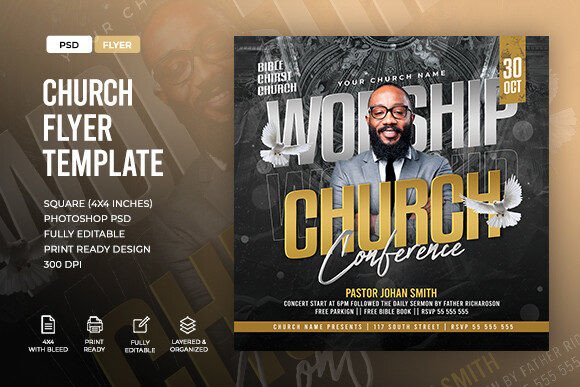
A Church Conference Flyer Template is a pre-designed digital file, typically in Photoshop PSD format, that serves as a blueprint for creating promotional materials. Unlike a blank canvas, this template comes with a layout already established, including placeholders for text, designated areas for images, and a cohesive color scheme. The specific version described here is formatted as a square 4×4” document with a 0.25” bleed, making it print-ready immediately upon customization.
The structure of these templates is highly organized, featuring labeled and grouped layers. This organization is critical for users who need to make quick edits without disrupting the overall design integrity. The template relies on free fonts, ensuring that the typography remains consistent regardless of the user's operating system or software version. However, it is important to note that while the layout is complete, the actual imagery is not included. Users must source their own high-resolution photos to fill the designated image slots.
Why Consider a Pre-Designed Template?
There are several compelling reasons why a church administrator or volunteer might choose a Church Flyer Template over other methods of creation. The primary driver is efficiency. Designing a professional-looking flyer from scratch involves decisions regarding hierarchy, spacing, typography, and color theory. For individuals whose primary role is pastoral care or event coordination rather than graphic design, this process can be time-consuming and stressful.
Furthermore, consistency is vital for branding. A well-constructed template ensures that all promotional materials for a conference maintain a unified visual identity. When multiple volunteers are involved in an event, having a single, editable master file prevents the confusion that often arises when different people create materials independently. The "easy to edit" nature of this specific template lowers the barrier to entry, allowing team members with only basic Photoshop knowledge to update text and swap images effectively.
Benefits and Practical Advantages
The advantages of utilizing a print-ready template extend beyond simple speed. First, the technical specifications are handled for the user. The inclusion of a 0.25” bleed ensures that when the flyer is printed and trimmed, there are no unsightly white edges. This level of technical precision is often overlooked by amateur designers, leading to wasted printing costs and unprofessional results.
Secondly, the use of fully editable layers provides flexibility. If a speaker changes last minute, or if the venue address needs correction, the text can be updated instantly without redrawing elements. The labeled groups within the Photoshop file act as a roadmap, guiding the editor to exactly where they need to click to make changes. This reduces the learning curve significantly, transforming a complex software environment into a manageable task list.
Finally, the aesthetic quality of a professionally designed template is generally superior to what a novice can achieve quickly. These designs are created with visual balance in mind, ensuring that the most important information—such as the date, time, and call to action—is prominent and easy to read.
Tradeoffs and Limitations
While the benefits are clear, there are tradeoffs to consider before committing to a Church Conference Flyer Template. The most significant limitation is the requirement for Adobe Photoshop. While the description notes that only "very basics" of the software are needed, the user must still have access to the application. This represents a cost barrier for some organizations that may rely on free online tools like Canva or Google Slides.
Additionally, the exclusion of stock images means the final look of the flyer depends entirely on the quality of the photos the user provides. A beautiful template can look disjointed if paired with low-resolution or poorly lit photographs. Users must have a library of high-quality images ready to go, or they must invest time in sourcing them separately.
Another consideration is the fixed format. The 4×4” square size is excellent for social media posts and handouts, but it may not be ideal for every distribution channel. If the church plans to mail postcards or create large banners, this specific template would require resizing, which could distort the layout or necessitate additional adjustments to the text and image placement.
When Is This Template the Right Fit?
This template is a strong fit for situations where time is limited, and a professional appearance is non-negotiable. It is particularly useful for mid-sized churches or conferences that do not have a dedicated graphic designer on staff but possess at least one tech-savvy volunteer familiar with Photoshop. If the goal is to produce a high-quality physical handout for a local community event, the print-ready specifications make this an excellent choice.
It is also appropriate when the event details are finalized. Because the layout is pre-set, it works best when the core information (speakers, dates, location) is known and unlikely to change drastically. In these scenarios, the template allows the team to focus on content rather than design mechanics.
When to Consider Alternatives
Alternatives may be worth considering if the organization has zero budget for software subscriptions. If purchasing a license for Photoshop is not feasible, web-based design platforms that offer similar templates might be a more accessible route. These platforms often include built-in stock photo libraries, solving the issue of missing images inherent in the PSD template.
Furthermore, if the marketing strategy relies heavily on dynamic, animated content for social media, a static PDF or PSD file may not suffice. In cases where video flyers or interactive graphics are required, investing in motion graphics software or hiring a designer might yield better engagement rates than a static print template.
If the event is extremely niche or requires a unique artistic style that deviates significantly from standard corporate or church aesthetics, a template might feel too generic. Custom design work, while more expensive and time-consuming, offers total creative freedom to match a specific theme that a pre-made template cannot accommodate.
Decision-Making Insights
To determine if the Church Conference Flyer Template aligns with your goals, evaluate your current resources against the requirements. Ask yourself if you have access to Photoshop and if your team has the capacity to learn the basic editing functions. If the answer is yes, and you have high-quality images available, this template offers a high return on investment in terms of time saved and professional output.
Consider the distribution method. If the primary medium is physical print, the bleed and resolution settings of this template are a major asset. If the distribution is exclusively digital on mobile devices, ensure the square format fits well within your social media strategy. Finally, weigh the cost of the template against the cost of custom design or the potential inefficiency of DIY design attempts. For many churches seeking a balance between professionalism and practicality, a well-organized, editable template provides a reliable middle ground.